Miget was proud to sponsor KRUG (Kraków Ruby Users Group) and SRUG (the Silesia Ruby Users Group), and our CEO Chris Taraszka gave a talk there called "Kamal Deploy: the VPS-vs-PaaS deploy you don't know yet, but will love." This post is the write-up. The short version: you can keep Kamal's workflow and still hand off the ops, and the trick under the hood is more fun than it has any right to be.
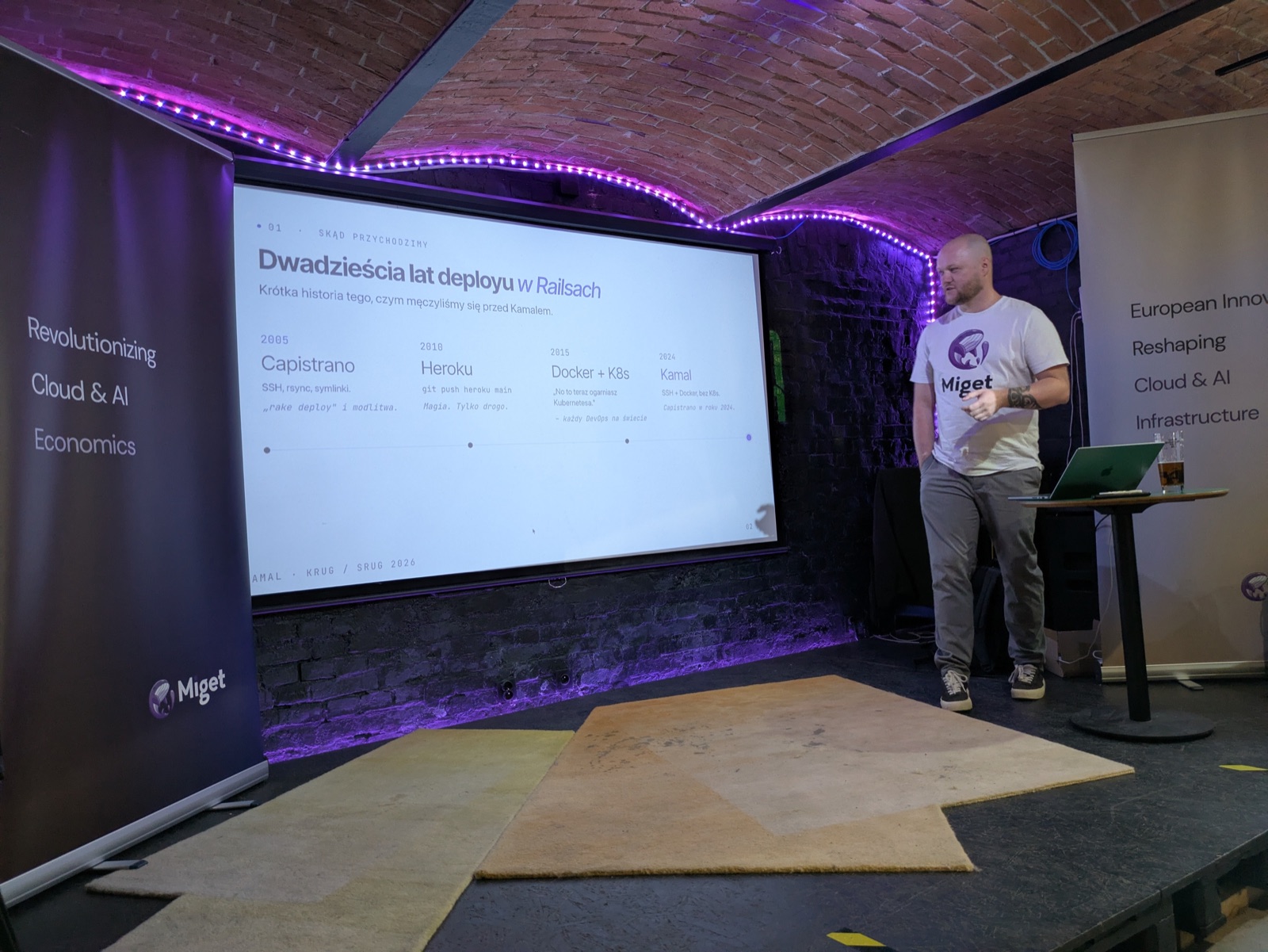
Chris on stage at KRUG / SRUG, in front of the slide this post opens with.
Twenty years of Rails deployment
The talk opened with the arc every Rails developer has lived through:
- 2005 - Capistrano. SSH, rsync, symlinks.
rake deployand a prayer. - 2010 - Heroku.
git push heroku main. Magic, just pricey. - 2015 - Docker and Kubernetes. "Time to learn Kubernetes," said every DevOps engineer, ever.
- 2024 - Kamal. SSH plus Docker, no Kubernetes. Capistrano in 2024, but good.
The point of the arc is the tension it never resolved. Developers want three things at once:
- Simplicity - Heroku DX.
git pushand it works. - Control - your own server, full SSH, logs in hand.
- Scale - zero-downtime, rolling restarts, more boxes on a click.
The question the whole talk circles: can you actually have all three together?
Meet Kamal
Kamal is 37signals' deploy tool, the Basecamp and HEY folks, and it is the default in new Rails 8 apps. Its pitch is "deploy web apps anywhere," and it delivers:
- Zero-downtime rolling deploys
- A built-in
kamal-proxyfor routing and the traffic switch - SSL via Let's Encrypt with zero config
- Asset bridging between releases
- One
deploy.yml, and that is it
The whole stack is just SSH, Docker, and kamal-proxy. No Helm, no charts, no values/ folder.
Act I: Kamal on a VPS
On a raw VPS, everything lives in one file:
service: my-rails-app
image: you/my-rails-app

servers:
  web:
    - 159.65.123.45

proxy:
  host: myapp.example.com
  ssl: true
  app_port: 3000

registry:
  username: your-dockerhub
  password:
    - KAMAL_REGISTRY_PASSWORD
You need four things before your first deploy: a VPS (Hetzner, DO, OVH - Ubuntu 22.04+, 1 GB RAM), an SSH key on the server, a DNS A record, and a registry (Docker Hub or GHCR). Then kamal setup once, and kamal deploy from then on.
kamal deploy is six steps with no magic: build on your laptop, push to the registry, pull on the server, run the new container, switch traffic once it passes its health check, clean up the old one. Zero-downtime comes down to that one rule - the new container must be healthy before the proxy sends it traffic.
The balance sheet
This is where the talk got honest. Everything that is not in deploy.yml, you handle yourself. After hours. In pyjamas. Sometimes in panic.
| Kamal on a VPS gives you | ...and hands you the rest |
|---|---|
| Full control - root, SSH, logs | Patching and CVEs, alone, at night |
| Cheap - a VPS from about $5/mo | DB backups, until you lose your first |
| One YAML, one command | The Postgres major upgrade that eats your weekend |
| SSL and zero-downtime out of the box | The TLS cert that expires at midnight on a Sunday |
| No vendor lock-in - move it anywhere | The pager that does not take a vacation |
None of that is an argument against Kamal. It is an argument about who runs the box.
Act II: the same deploy.yml, different infrastructure
Here is the reveal. Deploying the same app to Miget uses the same Kamal, the same commands, and a deploy.yml that is practically identical - only the host, port, and registry change:
service: my-rails-app-somnh
image: migetbgq/my-rails-app

servers:
  web:
    - tcp11.eu-east-1.onmiget.com

proxy:
  host: app.eu-east-1.migetapp.com
  ssl: true
  app_port: 5000

registry:
  server: registry.eu-east-1.miget.io

ssh:
  user: deploy
  port: 50715
You still run kamal deploy. You still get the same log output. But on the other end there is no VPS.
Kamal thinks it is talking to Docker. It is Kubernetes.
Miget runs a small kamal-shim - a pod in the cluster that exposes the Docker Engine API and translates every call into the Kubernetes API. Kamal speaks stock SSH and Docker; it never sees a single line of Kubernetes YAML. A few of the translations:
| Docker API call | Becomes on Kubernetes | What actually happens |
|---|---|---|
POST /containers/create | Patch the Deployment | Rolling update with the new image |
POST /containers/{id}/start | Scale replicas to >= 1 | Wake from zero if the app was asleep |
POST /containers/{id}/stop | no-op | K8s already did the rolling update; Kamal has no idea |
GET /containers/json | List pods + ConfigMap | Status comes from the pod, the source of truth |
POST /exec/{id}/start | kubectl exec | A bidirectional session into the pod |
POST /auth | imagePullSecret | Registry creds land in a K8s secret |
So the kamal deploy you run against Miget produces the same output as against a VPS and finishes in about the same time, but behind it is a real cluster: Deployment, Service, ConfigMap, rolling updates, IngressRoute, Traefik, and SSL. Kamal just never has to know.
Side by side
| Kamal + VPS | Kamal + Miget | |
|---|---|---|
| Setup time | 30-60 min | About 5 min |
| deploy.yml | Standard | Practically identical |
| SSL | kamal-proxy + Let's Encrypt | Traefik, automatic |
| Scaling | Manual, add an IP | UI or API |
| Monitoring | You roll your own | Built in |
| Database | You install and back it up | Managed PostgreSQL |
| Cost | ~$5-10/mo | Free tier, from $5/mo |
| Ops overhead | High | Low |
When to pick what
The talk did not declare a winner, because there isn't one. There is a fit.
Reach for Kamal on a VPS when ops is the point: you are learning DevOps and want hands on the metal, you need very specific hardware or a specific location, you already have an infra team that does this, or compliance forces you onto bare metal.
Reach for Kamal on Miget when you would rather write code: a hobby or side project on the free tier, an indie hacker or solo SaaS, or a production app with customers where you want scaling, preview apps, managed Postgres, monitoring, and backups included - and you would rather not be the on-call DevOps at 3 a.m.
The VPS-versus-PaaS choice was never really about the deploy command. It is about where your attention goes. Kamal keeps the command identical either way; Miget just changes what happens after you hit enter.
Thanks
Thanks to the KRUG and SRUG communities for having us. If you want to try the Miget side of the talk, the same deploy.yml, none of the pager duty, the Kamal deployment method is documented in the Miget docs, and you can start on app.miget.com.
What to read next
- Docker Compose Stacks: Deploy Multi-Service Apps From One File - Deploy a whole stack, not just one app
- Deploy 138 Self-Hostable Stacks on Miget with deployable.sh - The catalogue of ready-to-deploy stacks
- Why Choose Miget - How Miget compares on price and features